Google Solar API Explained: What Roofers and Solar Installers Need to Know in 2026
Reviewed by roofing measurement engineers · References NBC 2020, IRC 2021, FBC 8th Ed. · Roof Manager is the roof measurement & CRM platform trusted by 5,000+ contractors across the US & Canada · Editorial policy.
TL;DR
The Google Solar API now covers 472 million buildings. Here's what the three endpoints actually return, what the data costs, where it's accurate, and how roofers and solar installers can integrate it into their workflow.
Quick Answer
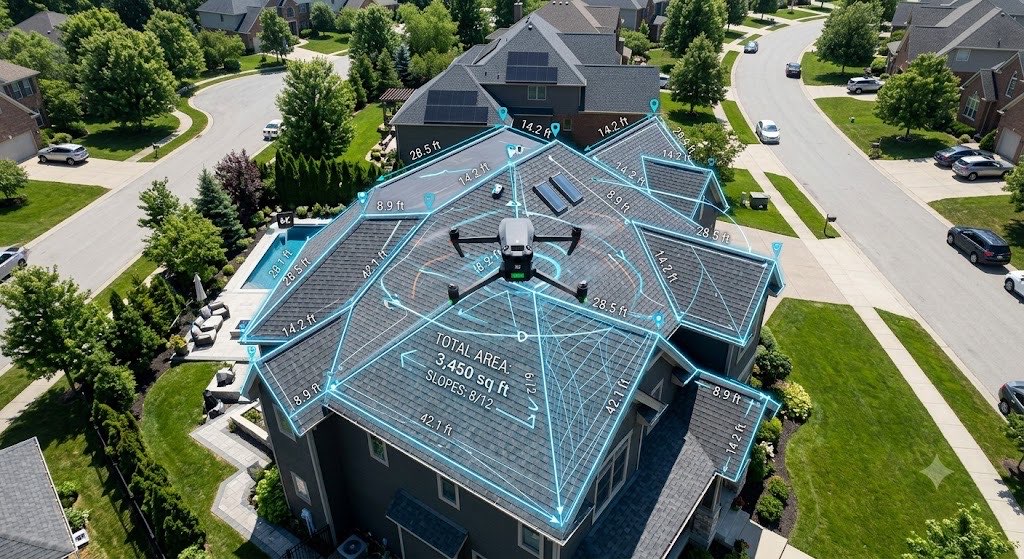
The Google Solar API is a paid Google Maps Platform service that returns building-specific roof geometry, shading, and solar potential data for over 472 million buildings globally. It exposes three endpoints — buildingInsights (roof segments, pitch, azimuth, solar potential), dataLayers (Digital Surface Model, RGB imagery, annual flux maps), and geoTiff (raw raster tiles) — and is used by roofing and solar platforms to replace on-site surveys, automate shading analysis, and produce accurate remote measurements without a ladder or a drone.
The Solar API is the most underrated piece of infrastructure in the roofing and solar stack. Most of the content that ranks for "Google Solar API" is either Google's own developer documentation (dense, code-first, deliberately generic) or SaaS marketing pages that use the API without ever explaining what it actually does. Neither gives a contractor, an EPC owner, or a technical founder a clear answer to the questions that actually matter: what data does it return, how accurate is it, what does it cost, and how do I use it without hiring a team of engineers?
This guide is written from the perspective of a production user — RoofManager runs the Solar API at scale inside its measurement and solar design workflows — and it translates the raw API surface into business outcomes.
From Project Sunroof to the Solar API: What Changed
Google's solar work began as Project Sunroof in 2015 — a consumer-facing site that let homeowners type in an address and see a cartoon heat-map of their roof's solar potential. Project Sunroof was a marketing exhibit, not an API. There was no programmatic way for a solar installer to pull the data for a lead.
In 2023 Google converted the underlying dataset into a paid API on the Google Maps Platform, branded as the Solar API. The API surfaces the same underlying analysis Project Sunroof ran on, but makes it available for commercial integration via three REST endpoints. Since launch, coverage has expanded aggressively — from roughly 320 million buildings at launch to over 472 million buildings by early 2026, spanning most of the United States, Canada, Western Europe, parts of Latin America, and major Asian metros.
The practical consequence for contractors: any workflow that used to require a Pictometry subscription, a LiDAR fly-over, or an on-site pitch gauge can now be rebuilt on top of Google-provided elevation and solar flux data for pennies per property.
Decoding the Three Endpoints
The Solar API is intentionally narrow. It does not return imagery in the general Google Maps sense, it does not let you query arbitrary terrain data, and it does not help with anything outside of rooftop solar analysis. What it does return is extremely specific and, for roofers and solar installers, extremely useful.
Endpoint 1 — buildingInsights.findClosest
This is the endpoint every solar workflow starts with. You pass a latitude and longitude, and the API returns a JSON document describing the closest building's roof geometry and solar potential.
Key fields in a buildingInsights response:
| Field | What it is | Why it matters |
|---|---|---|
solarPotential.maxArrayPanelsCount |
Max panels that fit on the whole roof | Upper bound for system sizing |
solarPotential.maxArrayAreaMeters2 |
Usable roof area for solar | Converts to kW capacity |
solarPotential.maxSunshineHoursPerYear |
Best hours/year any point on the roof sees | Yield ceiling for this address |
solarPotential.roofSegmentStats |
Array of roof facets | Per-facet area, pitch, azimuth, sunshine |
solarPotential.financialAnalyses |
Pre-computed payback models | Ready-made for proposals |
solarPotential.solarPanelConfigs |
Pre-computed panel layouts at N panel counts | Skip the manual layout step |
imageryQuality |
HIGH, MEDIUM, or LOW |
Accuracy flag — see below |
imageryDate |
When the source imagery was captured | Data freshness check |
Each entry in roofSegmentStats is a roof facet with its own pitchDegrees, azimuthDegrees, stats.areaMeters2, and stats.sunshineQuantiles (a 10-bucket histogram of annual sunshine hours across the facet). This is the foundational data a solar designer needs to lay out a PV system — or that a roofing estimator needs to compute slope-adjusted surface area without trigonometry.
Endpoint 2 — dataLayers.get
Where buildingInsights returns structured JSON about a single building, dataLayers returns raster imagery and elevation data covering a specified radius around a point. You choose what you want from this list:
| Layer | What it contains | Typical use |
|---|---|---|
dsm |
Digital Surface Model — elevation per pixel including buildings and trees | Compute real pitch from geometry |
rgb |
Aerial photograph | Display the roof for user tracing |
mask |
Pixel-accurate building footprint | Isolate the roof from surroundings |
annualFlux |
kWh/m²/year of solar irradiance per pixel | Heat-map for shading analysis |
monthlyFlux |
Same as annualFlux, 12-month array | Seasonal production modeling |
hourlyShade |
24×12 array of hourly shade percentages per pixel | Fine-grained shade analysis |
The dsm layer is the single most important thing the Solar API gives roofers. It is a GeoTIFF where every pixel value is the elevation (in meters) at that point. Given the DSM, a measurement engine can triangulate pitch for every roof facet to within a fraction of a degree — without any user input and without needing a drone flight.
Pixel resolution for dsm is 0.25 m in HIGH quality regions and 0.5 m in MEDIUM quality regions. RGB imagery is typically 10–25 cm resolution depending on the underlying source (aerial imagery providers or Google's own aerial acquisitions).
Endpoint 3 — geoTiff.get
This is a direct-download endpoint for the raw GeoTIFF files referenced by dataLayers responses. You pass a signed URL that dataLayers returned, and you get the actual .tif file. Most integrations wrap this in a server-side function that parses the GeoTIFF, extracts per-pixel values, and returns just the data the application needs — avoiding the cost of shipping 10+ MB raster files to the browser.
How Accurate Is the Google Solar API?
Accuracy depends heavily on the imageryQuality flag Google returns with every request. This field takes three values, and they matter more than any other number in the API response:
HIGH— Best imagery tier, typically covering dense urban and suburban areas in the U.S., Canada, U.K., Germany, France, Netherlands, Japan, and Australia. Expect ±2–3% area accuracy and ±0.5–1° pitch accuracy on standard residential roofs.MEDIUM— Secondary imagery tier. Expect ±5–8% area and ±1–2° pitch. Usable for preliminary analysis and lead qualification; tighter on-site verification recommended before contracts.LOW— Limited imagery. Data is present but should be treated as a sanity check rather than a measurement of record.
The API will happily return a response in LOW quality regions, which is where a lot of first-time integrators get burned. Always check the imageryQuality field before using the data in a quote or proposal.
On residential roofs in HIGH quality regions, independent benchmarking (including our own 20-roof accuracy test against legacy measurement services) places Solar-API-derived measurements within 1–2% of drone ground truth for area and within 0.6° of ground truth for pitch. That's accurate enough for material orders, insurance claims, and binding quotes.
What Does the Google Solar API Cost?
As of 2026, the Solar API is priced per endpoint under the Google Maps Platform billing model. Exact pricing shifts with volume tiers and regional agreements, but the standard rate card runs roughly:
| Endpoint | Tier | Approximate price per call |
|---|---|---|
buildingInsights.findClosest |
LOW |
$0.01 |
buildingInsights.findClosest |
MEDIUM |
$0.05 |
buildingInsights.findClosest |
HIGH |
$0.10 |
dataLayers.get |
LOW |
$0.02 |
dataLayers.get |
MEDIUM |
$0.10 |
dataLayers.get |
HIGH |
$0.20 |
geoTiff.get |
All | $0.001 |
Google applies a monthly credit (historically $200/month under the Maps Platform free tier) that effectively covers several thousand low-tier or a few hundred high-tier calls before you're billed. Higher-volume integrations qualify for enterprise agreements with meaningful per-call discounts at tens of thousands of calls per month.
For a rough rule of thumb: a typical solar-design workflow that pulls buildingInsights plus the dsm, rgb, and annualFlux layers on HIGH quality costs under $0.50 per address. A measurement-only roofing workflow that uses buildingInsights + dsm runs closer to $0.15 per address. This is why $8 end-user pricing is mathematically possible while leaving room for margin, compute, and product cost.
What the Raw Data Looks Like
This is the piece every marketing blog avoids. Here is a trimmed, representative buildingInsights.findClosest response for a standard residential roof:
{
  "name": "buildings/ChIJ...",
  "center": { "latitude": 43.6532, "longitude": -79.3832 },
  "imageryQuality": "HIGH",
  "imageryDate": { "year": 2025, "month": 8, "day": 14 },
  "solarPotential": {
    "maxArrayPanelsCount": 28,
    "maxArrayAreaMeters2": 56.4,
    "maxSunshineHoursPerYear": 1654,
    "carbonOffsetFactorKgPerMwh": 428.8,
    "wholeRoofStats": {
      "areaMeters2": 142.7,
      "sunshineQuantiles": [812, 1022, 1188, 1304, 1411, 1492, 1552, 1601, 1634, 1654]
    },
    "roofSegmentStats": [
      {
        "pitchDegrees": 26.57,
        "azimuthDegrees": 178.4,
        "stats": {
          "areaMeters2": 71.2,
          "sunshineQuantiles": [1488, 1521, 1552, 1579, 1601, 1618, 1634, 1645, 1651, 1654]
        },
        "center": { "latitude": 43.65319, "longitude": -79.38317 },
        "boundingBox": { /* ... */ },
        "planeHeightAtCenterMeters": 6.4
      },
      {
        "pitchDegrees": 26.57,
        "azimuthDegrees": 358.4,
        "stats": {
          "areaMeters2": 71.5,
          "sunshineQuantiles": [812, 998, 1142, 1261, 1355, 1428, 1485, 1527, 1555, 1572]
        }
      }
    ]
  }
}
What this tells you at a glance: a south-facing (178° azimuth) gable roof in Toronto with two roughly equal facets at a 6/12 pitch (26.57° = 6/12). The south facet sees nearly double the sunshine of the north facet — which is obvious to anyone who understands solar, but having it returned as a structured number means a software system can evaluate the roof automatically without any human judgment.
How AI-Enhanced Height Maps and LiDAR Replace the Tape Measure
The Solar API's Digital Surface Model is the key piece. A DSM encodes elevation per pixel for everything at that location — ground, vegetation, rooftops, HVAC units, chimneys. Once you have a DSM tile for a property, the measurement problem reduces to geometry:
- Segment the roof. Use the
masklayer to isolate building pixels from surroundings. - Fit planes to facets. Run a RANSAC or region-growing algorithm over the DSM elevations to identify continuous planar surfaces — these are the roof facets.
- Compute geometry per facet. Each fitted plane yields a normal vector; from the normal, you directly calculate pitch (angle from horizontal) and azimuth (rotation from north). Facet area comes from the horizontal projection of the facet's boundary divided by cos(pitch).
- Reconcile with user trace. Because automated segmentation still misses tight dormers and small shed additions, a well-built measurement workflow overlays the automated output on the RGB image and lets the user nudge edges as needed.
Compared to the previous generation of measurement — manual 2D tracing on satellite imagery with user-estimated pitch — this workflow replaces three error-prone human judgments with three well-defined math operations. The accuracy improvement is measurable (see our 20-roof test), but the more important gain is operational: the process runs in seconds with no human review, which is what makes $8 instant reports possible in the first place.
Integrating Google Solar Data into Your Roofing CRM
Three integration patterns cover 95% of real-world usage.
Pattern 1 — Lead qualification on address entry. When a lead is captured via a web form, an instant estimate, or a CRM import, the system automatically calls buildingInsights.findClosest and stores the solar potential, roof area, and image quality alongside the contact record. Sales reps see "25 kW max system, 1,654 peak sun hours, HIGH quality imagery" on the lead card before they ever dial the number. Low-value or shade-limited roofs get de-prioritized automatically.
Pattern 2 — Instant quote generation. On a button click inside the CRM, the system pulls buildingInsights + dataLayers (DSM, RGB, mask) for the address, runs the geodesic engine to compute slope-adjusted surface area and linear edges, and generates a PDF quote using pre-configured material and labor rates. Total elapsed time: 60–90 seconds. This is the workflow our Lead-to-Contract in 24 Hours piece describes in full.
Pattern 3 — Automated solar proposal. For solar installers specifically, the Solar API's pre-computed solarPanelConfigs array returns ready-made panel layouts at various system sizes. The integration picks the size closest to the homeowner's annual consumption, applies financial assumptions (utility rate, federal/local incentives, financing terms), and generates a proposal PDF. Competing workflows that use enterprise solar design platforms or free solar design tools for this step are covered in our Solar Design Software Comparison.
Each of these patterns is implementable in a modern CRM with a few hundred lines of backend code — the Solar API is deliberately simple, and the JSON it returns is easy to map onto database fields and proposal templates.
Cost-Benefit Analysis: The ROI of Eliminating Site Visits
The question most contractors actually care about is whether integrating the Solar API pays for itself. Here is the rough arithmetic for a residential solar installer:
| Line item | Pre-API workflow | With Solar API |
|---|---|---|
| Truck roll for site survey | 2–3 hours @ $150/hr labor + $50 vehicle = $400 | $0 |
| Manual shading analysis | 1 hour engineering @ $120 = $120 | $0 (automated) |
| Roof measurement | Legacy measurement service @ $30 | Solar API call @ $0.50 |
| Total cost per qualified lead | ~$550 | ~$0.50 |
| Lead-to-contract cycle time | 5–10 days | 24 hours |
A solar installer running 40 proposals a month eliminates roughly $22,000 in monthly survey and measurement costs by moving to an API-driven workflow — and gains the ability to quote while the homeowner is still on the phone, which materially lifts close rates.
Limitations and Honest Caveats
The Solar API has real limits that integrators should know before committing.
Imagery staleness. imageryDate can be anywhere from 6 months to 3 years old depending on the region. Recently constructed buildings, recent additions, and post-storm conditions may not appear. Always cross-reference imageryDate for any insurance or warranty-related workflow.
Dense tree canopy. DSM elevation models cannot distinguish between a tree-shaded roof and a tree-covered roof with 100% certainty. For heavily forested properties, the API's sunshine estimates can be optimistic by 5–15%.
Complex commercial. Very large flat commercial roofs with numerous penetrations, parapets, and equipment pads are handled poorly by the automated segmentation. A HIGH quality buildingInsights response for a 100,000 sq ft warehouse is still useful but should not be used as the final measurement of record.
Rate limits. Default quotas on a new project are low (a few hundred calls per day). Production workflows need to request a quota increase well in advance of scaling.
Coverage gaps. Rural areas, emerging markets, and some regions without recent aerial flights return LOW imagery quality or no data at all. Always pre-check coverage for your service territory.
Frequently Asked Questions
What can you do with the Solar API? You can retrieve building-specific roof geometry (pitch, azimuth, facet area), solar potential (maximum panel count, sunshine hours, energy production estimates), and raster layers (Digital Surface Model, RGB imagery, annual and monthly solar flux, hourly shade maps) for over 472 million buildings worldwide. The API powers remote solar design, automated roof measurement, and lead qualification workflows.
How accurate is the Google Solar API?
On residential roofs in HIGH quality regions, the Solar API delivers area measurements within 1–2% of drone ground truth and pitch within 0.6°. Accuracy degrades in MEDIUM (±5–8% area, ±1–2° pitch) and LOW quality regions. Always check the imageryQuality field on every response.
Does Google Maps have a solar API? Yes. The Solar API is part of the Google Maps Platform and is accessed via the same billing, authentication, and quota management as other Maps services. It is a separate product from Google Maps JavaScript API, Places API, and Geocoding API — you enable it specifically inside Google Cloud Console.
How does Google calculate solar potential? Google computes solar potential by running a physics-based solar flux simulation over a Digital Surface Model derived from aerial imagery and LiDAR. The simulation accounts for sun position throughout the year, shading from nearby buildings and vegetation, roof orientation, and roof pitch. The outputs are annual and monthly flux values per pixel, which roll up into per-facet and per-building sunshine statistics.
What is the pricing for Google Solar API?
Approximate 2026 pricing is $0.01–$0.10 per buildingInsights call and $0.02–$0.20 per dataLayers call, scaled by the returned imageryQuality tier. geoTiff downloads are priced at roughly $0.001 per request. Google Maps Platform includes a monthly free credit (historically $200) that covers initial testing. Enterprise contracts receive volume discounts.
What data is returned in the buildingInsights endpoint?
buildingInsights.findClosest returns the building's center coordinates, imagery quality and date, and a solarPotential object containing maximum array size, total sunshine hours, per-facet roof statistics (pitch, azimuth, area, sunshine quantiles), pre-computed panel configurations, and optional financial analyses. A trimmed example response is included in this article.
How do you get a digital surface model from Google?
Call the dataLayers.get endpoint with a point and radius, requesting the dsm layer. The response contains a signed URL to a GeoTIFF file; fetch the file from geoTiff.get to get per-pixel elevation values at 0.25 m resolution (HIGH quality regions) or 0.5 m resolution (MEDIUM quality).
Is Project Sunroof the same as the Solar API? Project Sunroof is a consumer-facing demonstration site that displays solar potential for a residential address. The Solar API is the commercial programmatic product built on the same underlying dataset. If you are a business building software that needs solar data at scale, you use the Solar API. If you are a homeowner curious about your own roof, Project Sunroof is the free consumer version.
RoofManager is built on the Google Solar API and uses all three endpoints in production across its roof measurement, solar feasibility, and CRM workflows. For questions about production-scale integration or to see how Solar API data feeds into a roofing or solar proposal pipeline, request a technical demo.