How it works · address → report → job

How Roof Manager Works

From property address to finished roofing job.

Start with an address. Roof Manager turns the available aerial imagery into a reviewed roof measurement report, traced by a person and calculated by software, then gives your team the tools to turn those measurements into a proposal, a scheduled job and an invoice.

  • 2 free reports, no credit card
  • Traced and reviewed by people
  • 1–3 hours, usually under an hour
01 · AddressSample Propertyaddress removed
02 · Aerial imagery  →  03 · Traced
The sample roof on the aerial image, traced: the outline in green and every ridge, hip and valley in blue
Roof area
7,923 sq ft
Pitch
8:12
Planes
31
Eaves
383 LF
04 · Reviewed report
Page 1 of the finished sample report: project totals, the aerial image and the edge lengths
05 · Proposal · job · invoice
  • ProposalBuild from Report
  • JobScheduled · Demo crew
  • InvoiceDraft · Pay Now link
Roof Manager sample report · address and location removed · CRM states shown with demo data

Follow one roofing job from address to invoice.

Nine hand-offs between the address and the payment. Pick a step to see what Roof Manager shows at that moment, and what moves the job to the next one: a person, a button you press, or the software by itself.

  1. 01Property
  2. 02Imagery
  3. 03Trace
  4. 04Report
  5. 05Job
  6. 06Proposal
  7. 07Schedule
  8. 08Invoice
  9. 09Payment

Step 01 · Property

Sample Property selected

You search the address, confirm the pin sits on the right building, and press Request Report. One report credit is used; the order joins our trace queue.

You place the pin

Read about this step

Order a roof reportStep 1 · Pin the roof
The sample property on the aerial image with the order pin placed on the roofPin is on the roof ✓
Request ReportReady in 1–3 hours · uses one report credit

Step 02 · Imagery

Aerial imagery available

Our team opens the order on the aerial imagery for the property and picks the clearest available view. If the roof cannot be seen well enough to measure, the report is declined and the credit comes back; nothing is guessed.

Our team checks it

Read about this step

Imagery checkOur team
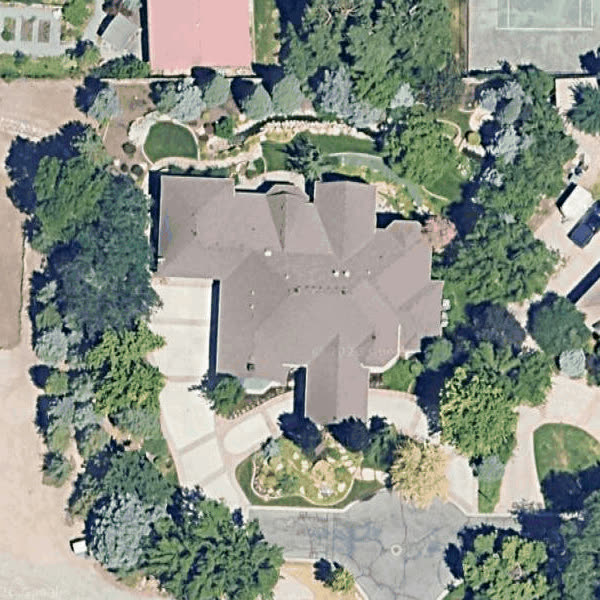
The clearest available aerial view of the sample roof, ready to trace
Roof visible
Yes · clear view, edges readable
If it were not
Declined, email sent, credit returned

Step 03 · Trace

Roof geometry traced

A person traces the outline, then every ridge, hip and valley, and sets the pitch. The software does the arithmetic from that trace: sloped areas, edge lengths, waste and materials.

Our team traces it

Read about this step

TracerOur team
The sample roof traced on the aerial image: outline in green, ridges, hips and valleys in blue
  • Outline · eaves and rakes
  • Ridges, hips, valleys
  • Pitch 8:12

Step 04 · Report

Reviewed measurement report

A second look checks the report before it is released. Then you get the email, and the PDF is in your dashboard. Reports are delivered in 1–3 hours, and usually in under an hour.

Our team presses Submit to Customer

Read about this step

Report · reviewedSubmitted to customer
Page 1 of the sample report: project totals, the aerial image and every edge length
Roof area
7,923 SF
Pitch
8:12
Planes
31
Eaves
383 LF
✉ Your roof report is readyEmail · dashboard · PDF

Step 05 · Job

On the job record for the property

The report sits on the job record for its address, beside any proposal, invoice or scheduled work for the same property. Attaching it to a customer is optional, and ordering never creates a customer by itself.

Automatic

Read about this step

Jobs · Sample PropertyJob record
  • ReportReady · 7,923 SF · 8:12
  • CustomerSample Homeowner · attached (optional)
  • ProposalNone yet
  • Scheduled workNone yet
  • InvoiceNone yet

Everything for this address, in one place. Grouped by the property, automatically.

Step 06 · Proposal

Build from Report

The proposal lines take their quantities from the report's material take-off and their prices from your own price sheet. Unpriced materials come through at $0, flagged, so you fill them in.

You press Build from Report

Read about this step

Proposal · Sample HomeownerBuild from Report
LineQuantityPrice
Field shingles257 bundles× your price
Underlayment8,557 SF× your price
Ridge cap573 LF× your price
Drip edge485 LF× your price
Valley flashing30 pcsneeds price

Quantities from the report · prices from your saved price sheet · unpriced lines flagged

Step 07 · Schedule

Job scheduled

You schedule the job with the date, time, duration and crew. With Google Calendar connected the event is created and updated on your calendar; your Google events are shown in Roof Manager read-only.

You schedule · calendar push is one-way

Read about this step

Schedule the jobJobs
  • JobRe-roof · Sample Property
  • WhenThu · 8:00 AM · 2 days
  • CrewDemo crew · 3 people
  • Google CalendarEvent created · one-way

Google events show in Roof Manager read-only. Reschedule here, not in Google.

Step 08 · Invoice

Convert to Invoice

One button turns the proposal into a draft invoice with the same line items. You review the draft, then send it.

You press Convert to Invoice

Read about this step

Invoice · draftConvert to Invoice
LineQuantityPrice
Field shingles257 bundlesfrom the proposal
Underlayment8,557 SFfrom the proposal
Ridge cap573 LFfrom the proposal
Drip edge485 LFfrom the proposal
Status · DraftReview it, then send

Step 09 · Payment

Square payment link

The invoice carries a Square Pay Now link when your Square account is connected; the homeowner pays on Square and the money goes to you. Roof Manager does not mark the invoice Paid for you: you do, once the payment arrives.

You send the link · you mark it Paid

Read about this step

Invoice · sentSquare
Pay Now · Square

The homeowner pays on Square’s checkout. The money goes to your Square account.

  • PaymentReceived in your Square account
  • Invoice statusPaid · you mark it
Automatic
Roof Manager does it by itself
Our team
A Roof Manager person does it for you
You choose
A decision you make
You press …
A button in the app
One-way sync
Roof Manager → Google Calendar only
Read-only
Shown, not editable
Manual status
You set the status yourself

From address to roof measurement report

The core of Roof Manager, and the only part you need to order a report. People trace and check the roof; software does the arithmetic. Reports are delivered in 1–3 hours, and usually in under an hour.

  1. 1 · Property

    Start with the property

    Search the address, or drop the pin yourself where there is no house number, and confirm the pin sits on the right building. A detached garage or shop gets a second pin. A pin left on the street is refused, so the order always names a roof.

    Report availability depends on the imagery for that spot, not on the address alone. See coverage by country.

    You place the pin Request Report joins the queue

    • Pin on the roof, not the street
    • Second pin for a detached structure
    • Known pitch, drone photos and a customer: all optional
  2. 2 · Imagery

    Roof measurements start with imagery

    Our team opens the order on the aerial and satellite imagery available for the property and picks the clearest view of the roof. What the imagery shows is what can be measured: resolution, shadows, tree cover and hidden edges set the ceiling on measurement quality.

    Poor imagery is not guessed. What happens when imagery is poor.

    Our team checks it

    The clearest available aerial view of the sample roof before tracing
  3. 3 · Trace

    The roof geometry is traced

    A member of our team traces the roof on the imagery: the outline first, then every ridge, hip and valley, with the pitch set for the roof. Where a roof has more than one level or a detached structure, each is traced as its own section.

    • Outline: eaves and rakes
    • Ridges, hips and valleys
    • Pitch, and roof planes where the roof has more than one

    Our team traces it

    The sample roof traced on the aerial image: outline in green, ridges, hips and valleys in blue
  4. 4 · Calculations

    Measurements become report quantities

    The measurement engine turns the trace into the numbers a roofer prices from: the sloped roof area and the footprint, the predominant pitch and the area at each pitch, the number of roof planes, the length of every eave, rake, ridge, hip and valley, a waste-factor table and the material take-off.

    Explore the sample report to see every page.

    Automatic

    Roof area
    7,923 SF
    Pitch
    8:12 · 33.7°
    Roof planes
    31
    Eaves
    383 LF
    Rakes
    66 LF
    Ridges
    160 LF
    Hips
    371 LF
    Valleys
    269 LF
    Waste
    8% → 8,557 SF
    Shingles
    257 bundles

    Sample roof · from the Roof Manager sample report

  5. 5 · Review

    Reviewed before release

    Every generated report waits in review, and nothing reaches you until a person has looked at it and pressed Submit to Customer. Automated checks flag a report whose numbers do not add up so it gets a second look; a roof that cannot be measured well is declined and the credit returned.

    Automatic hold Our team presses Submit to Customer

    1. Generatedawaiting review
    2. Checkedtrace, pitch, totals
    3. Submit to Customerreleased
  6. 6 · Report

    Receive the roof measurement report

    You get the email “Your roof report is ready”, and the report is in your dashboard as a PDF: the project totals, the roof outline over the aerial, the diagrams with every edge length, the areas by section and the material summary. Change the waste factor there if you need to.

    Email + dashboard

    Sample report page 1: project totalsSample report page 3: the roof diagram with every edge lengthSample report page 5: the material summary

Every screen of the order, with the buttons named: how to order a roof measurement report. Why order one at all: roof measurement reports for roofing contractors.

What is included in the report?

A PDF roof measurement report in your dashboard, with an email when it is ready. It carries the total roof area, the predominant pitch, the number of roof planes, the length of every eave, rake, ridge, hip and valley, the roof outline traced over the aerial image, plan-view diagrams with every edge length and section area, a waste-factor table and the calculated material quantities. 5 pages for the sample roof.

See every page of the sample report · what a roof measurement report is for

How long does a roof measurement report take?

1–3 hours, usually under an hour. Imagery availability, roof complexity and the review queue affect the time: a complex roof or one that needs a re-trace takes longer. There is no fixed delivery time.

Does someone need to climb the roof?

No. The standard report is measured from available aerial and satellite imagery, so nobody from Roof Manager climbs the roof and you do not need to send a crew to measure. A measurement from imagery is not a roof inspection: physical verification is still appropriate where the work or the code requires it.

How accurate are aerial roof measurements?

98.5%accurate against an on-roof tape measure, on high-quality aerial imagery

On properties with high-quality imagery, Roof Manager measurements can achieve 98.5% accuracy against an on-roof tape measure.

Measurement accuracy depends on the quality and visibility of the available satellite/aerial imagery. Trees, shadows, low-resolution imagery and hidden roof edges can reduce accuracy. Physical verification is recommended for code-critical work.

How imagery sets the accuracy of a report

What happens when imagery is poor?

Our team does not guess. If the available imagery is too blurry, shadowed, out of date or obstructed to measure the roof, the report is declined: you receive an email saying we are unable to complete it, and the report credit is returned to your account. You can also attach your own straight-down drone photos on the order form, and our team measures from those instead.

Our team asksIs the imagery good enough to measure this roof?

Yes Continue

  1. Trace the outline, ridges, hips and valleys
  2. Calculate the quantities
  3. Review, then Submit to Customer
  4. You get the email and the PDF

No Do not guess

  1. The report is declined
  2. You receive the email “We’re unable to complete this report”
  3. The report credit returns to your account (a one-off purchase comes back as a report credit)
  4. Have straight-down drone photos? Attach them on the order form and our team measures from those

What happens after the roof report?

You can simply download the PDF and use it however you price work today. Or stay in Roof Manager: the report already sits on the job record for the property, Build from Report starts a proposal from its quantities and your price sheet, the job is scheduled with your crew and pushed to Google Calendar, and Convert to Invoice makes the draft invoice with a Square payment link. None of that is required to order a report.

Path A · Use the report

Download it and price the job your way.

  • The PDF is yours to keep and share
  • Change the waste factor in the dashboard
  • No CRM step is required to order a report

Keep the property and job history together

Roof Manager keeps two records that belong together. The customer record holds who they are and every call, text, email and note. The job record holds what Roof Manager has for the property: the reports, proposals, invoices, scheduled work and calendar events for that address, with a status, the job value and the amount owing. Ordering a report never creates a customer; attaching the report to one is your choice.

How the roofing CRM works.

Proposal

Build a proposal from measured quantities

Report quantities257 bundles · 8,557 SF · 573 LF
Your price sheetYour products, your prices
ProposalPriced lines, your terms

You press Build from Report. The measured and take-off quantities fill the proposal lines; the prices come from the price sheet you saved, never from Roof Manager. A material you have not priced comes through at $0 and is flagged “needs price” so nothing goes out unpriced by accident.

  • Line items with a tax rate and a dollar or percentage discount
  • A share link, a viewed count and an online signature
  • Sent from your own Gmail address
  • Acceptance does not create a job or an invoice by itself

You press Build from Report You send it

Job

Schedule the roofing job

Schedule the job from the customer with a date, a time, the duration, the job type and the crew doing it. The Jobs tab lists today, tomorrow and upcoming, and every job for a property sits on its job record.

Roof Manager → Google Calendar
Jobs and appointments you schedule are created and updated on your Google Calendar. One-way sync
Google Calendar → Roof Manager
Your existing Google events are shown in Roof Manager. Read-only
Edits made in Google
Do not update the Roof Manager job. Reschedule in Roof Manager.

How each Roof Manager integration works.

Invoice · payment

Create an invoice and payment link

  1. Convert the work into an invoice. You press Convert to Invoice on the proposal and get a draft invoice with the same line items. Review the draft before you send it. You press Convert to Invoice
  2. Send a Square payment link. With your Square account connected the invoice carries a Pay Now link, for the full amount or a deposit. The homeowner pays on Square’s checkout; the money goes to your own Square account, and Square charges its own processing fee. You send the link
  3. Mark it Paid. Roof Manager does not currently mark the invoice Paid for you. When the payment arrives, you set the status. Manual status

Square, Google Calendar, Gmail and QuickBooks: what each connection does.

How much does Roof Manager cost?

Start with 2 free reports, then pay per report or take a monthly plan. The job record, proposals, scheduling and invoicing come with every account.

Start free

$02 reports

No credit card

Pay as you go

$10CAD / report

≈ $7 USD

Monthly

$199CAD / month

Up to 30 reports

Annual: $1,990 CAD/year · 360 reports.

Billed in Canadian dollars; USD is approximate. Website estimates for your homeowners: the Instant Estimator.

How Roof Manager works FAQ

More in the Roof Manager FAQ.

How does Roof Manager create a roof measurement report?

You enter the property address and place the pin on the roof. Our team opens the available aerial imagery and a person traces the roof outline, ridges, hips and valleys and sets the pitch. The measurement engine calculates the areas, edge lengths, waste and material quantities from that trace, a second person reviews the report, and it is released to your dashboard and email as a PDF.

Does someone physically measure the roof?

No. The report is measured from aerial and satellite imagery, so nobody climbs the roof. Physical verification is still recommended for code-critical work; a measurement from imagery is not an inspection.

Does Roof Manager use AI to trace roofs?

No. A member of our team traces every roof on aerial imagery and the software does the calculations. Automated checks can hold back a report whose numbers do not add up, but they do not draw the roof.

What imagery does Roof Manager use?

Aerial and satellite imagery from mapping providers: our team picks the clearest view available for the property when they open the order. If that imagery is blurry, shadowed or out of date, you can attach your own straight-down drone photos on the order form and our team measures from those.

What happens if the imagery is poor?

The report is declined rather than guessed. You receive an email saying we are unable to complete the report, and the report credit is returned to your account; a one-off purchase comes back as a report credit.

How long does a roof measurement report take?

Reports are delivered in 1–3 hours, and usually in under an hour. Imagery availability, roof complexity and the review queue affect the time; there is no fixed delivery time.

How accurate are the measurements?

On properties with high-quality imagery, Roof Manager measurements can achieve 98.5% accuracy against an on-roof tape measure. Measurement accuracy depends on the quality and visibility of the available satellite/aerial imagery. Trees, shadows, low-resolution imagery and hidden roof edges can reduce accuracy. Physical verification is recommended for code-critical work.

What measurements are included in the report?

Total roof area in square feet and roofing squares, the predominant pitch, the number of roof planes, the length of every eave, rake, ridge, hip and valley, the roof outline over the aerial image, plan-view diagrams with every edge length and section area, a waste-factor table and the calculated material quantities (shingles, underlayment, ice and water shield, ridge cap, starter, drip edge, flashing).

Do I receive a PDF?

Yes. The report is a PDF you download from your dashboard, and you get an email the moment it is released.

Can I see a sample report?

Yes. The complete Roof Manager sample report, with the property’s address and location removed, is at /sample-report, and the same 5-page report downloads as a PDF there.

How much does a roof measurement report cost?

Your first 2 reports are free, with no credit card. After that a report is $10 CAD, or $199 CAD a month covers up to 30 reports. The CRM, proposals, invoicing and scheduling come with every account.

Can I build a proposal from the report?

Yes. When the report is ready, Build from Report fills the proposal lines with the quantities from the material take-off and prices them from your own saved price sheet. Materials you have not priced come through at $0, flagged, for you to fill in.

Does Roof Manager create the customer and job automatically?

A lead that arrives with a phone number or email is saved as a customer automatically. Ordering a report does not create a customer: the report sits on the job record for its property address, and attaching it to a customer is optional.

How does the Google Calendar connection work?

One way. Jobs and appointments you schedule in Roof Manager are created and updated on your Google Calendar, and your existing Google events are displayed in Roof Manager read-only. Changes made in Google do not update the Roof Manager job.

How do Square payments work?

The invoice or proposal carries a Square Pay Now link when your Square account is connected, for the full amount or a deposit. The homeowner pays on Square’s checkout and the money goes to your own Square account. Roof Manager does not mark the invoice Paid for you; you mark it Paid when the payment arrives.

Where are roof measurement reports available?

Available across the U.S., Canada and additional supported regions, subject to imagery availability. See coverage by country.

Can I just use the report without the CRM?

Yes. Order the report, download the PDF and price the job however you do today. The job record, proposals, scheduling and invoicing are there when you want them, and they come with every account at no extra cost.

Start with your next address.

Try it on your own roofs

2 full roof reports, no credit card required. Reports are delivered in 1–3 hours, and usually in under an hour.

Get 2 Free Reports

See the finished report first

The complete 5-page Roof Manager sample report, page by page, with every measurement explained.

See a Sample Report

Want to see it on one of your properties? Book a demo or email sales@roofmanager.ca.